Complete Smart Helmet Monitoring Platform
Last reviewed:
A ready-to-use operational platform for device management, GPS visibility, supported alerts, communications, media evidence and administration.
Choose the complete platform when your team wants established monitoring workflows without building the full application stack. It can support a sample demonstration, project-approved private deployment, or enterprise integration, subject to the confirmed device, hosting and service scope.
What does the complete monitoring platform provide?
The complete monitoring platform connects smart helmet devices with supervisors and command teams. It provides a central application for device status, GPS tracking, supported alerts, video and media workflows, playback, user roles and administration, reducing the amount of software a customer must build for standard operations.
Customers can use the platform as the main operational application or connect selected information to an existing enterprise system. Available data, events, media, APIs, SDK components, protocols and RTSP paths are confirmed for the selected device and project.
G808 and G901 terminals
Smart helmet devices capture field data such as video, location, alarms, status, and media files.
Monitoring and management
The platform handles dashboards, live monitoring, alert workflows, playback, device management, and user roles.
API or local architecture
Existing systems can access selected data through project-approved integration paths after technical evaluation.
Watch the Complete G901 Smart Helmet Platform Demo
See a real G901 detachable helmet-mounted recorder working with the HelmetSight monitoring platform. This demonstration covers platform administration, device management, live video and voice communication, GPS and geofence workflows, supported alarms, and media playback.
Click the preview to play the demonstration on this page.
Watch on YouTubeMap display relies on Google services. The map may not load in mainland China, where access to Google services is restricted. In regions where Google services are available, authorized users can view supported map and location information normally.
What You Can Do on the Platform
Device Status Dashboard
Online/offline, battery, connectivity, device list overview
Live GPS Tracking
Live map view, location updates, team visibility by site/project
Alert Center
SOS and safety alarms, acknowledgment workflow, incident records
Track Playback
Historical route review and timeline replay for investigation
Media Evidence (if enabled)
Photo/video records linked to events for incident review
User & Role Management
Role-based access for admins, supervisors, dispatchers
Modules depend on project configuration and policy.
Standard Platform Flow and Integration Paths
In a standard deployment, smart helmet devices connect to the HelmetSight platform through 4G, Wi-Fi, or a project-defined network. Supervisors use the platform dashboard for monitoring, while third-party systems can access selected data through approved integration paths.
Smart Helmet Devices
G808 and G901 capture device status, GPS/location, alarms, video/media data, and field operation events.
Network Connection
Devices connect through 4G, Wi-Fi, LAN, or project-specific network architecture depending on site conditions.
HelmetSight Platform
The platform manages live monitoring, alerts, playback, device/user management, storage, and selected data services.
Dashboard or Integration
Supervisors use web/mobile dashboards, while third-party systems can connect through approved APIs or local deployment paths.
Sample demonstration path
Use the one-month sample environment with 1–2 devices to demonstrate selected functions. It is not the assumed overseas production POC, API environment or long-term hosting model.
View cloud deploymentOn-premise platform path
Best for private networks, local storage, data residency, lower-latency local workflows, and projects that need local platform control.
View on-premise deploymentThird-party integration path
Best for customers that need GPS, alarm, status, media references, or video access inside an existing command or AI platform.
View integration guideImportant integration note
Direct low-level device-to-third-party integration is not the default path. For video streams, local AI boxes, RTSP, GB/T 28181, API access, or custom APK workflows, the technical route should be confirmed based on the device model, deployment model, network architecture, and customer-side system requirements.
Platform Core Modules
Overview Dashboard (Map + Status)
- Map view for live GPS positioning
- Device list with online/offline and battery
- Quick view of alerts and key events
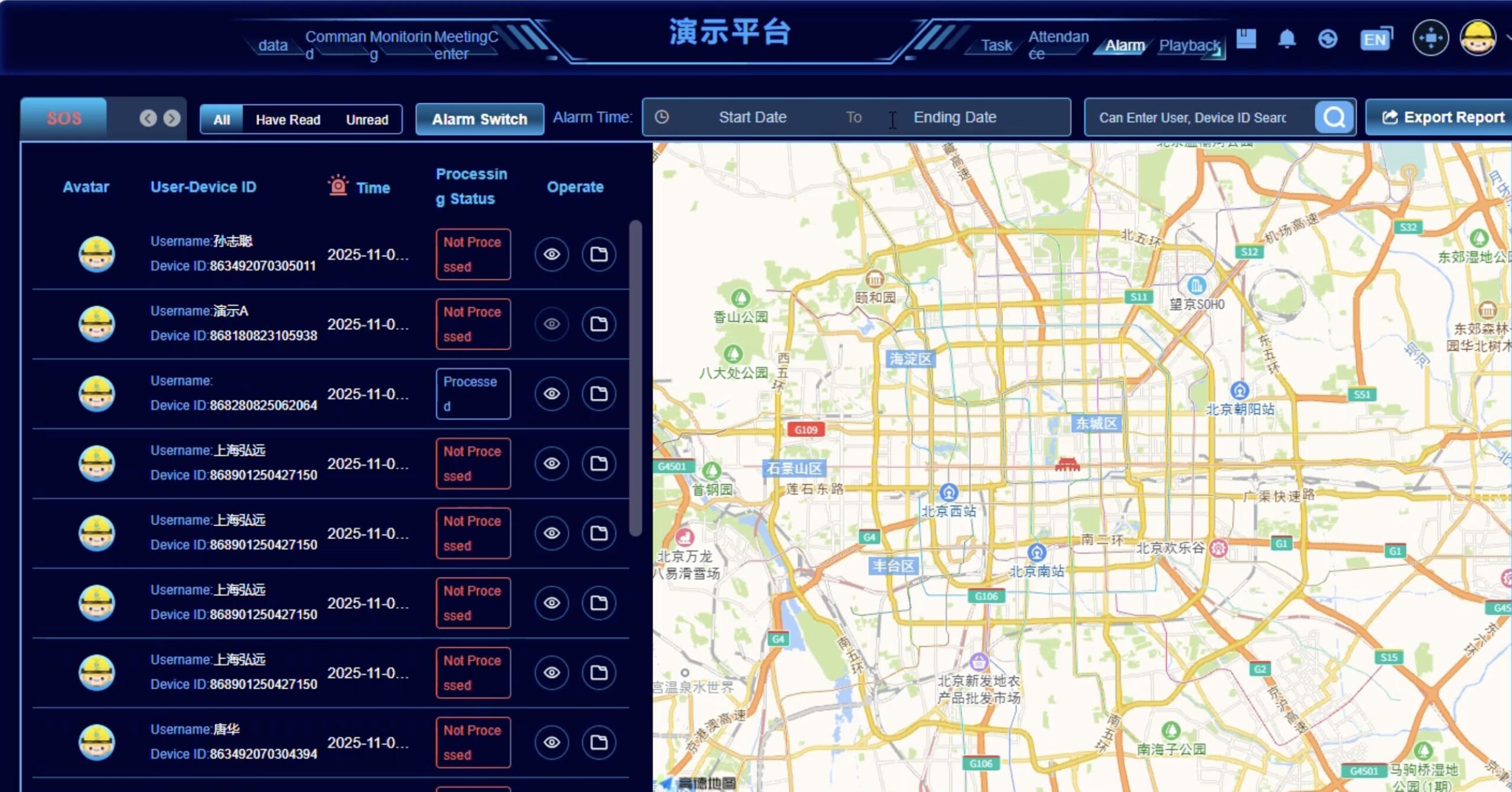
Live GPS map + device status + alerts
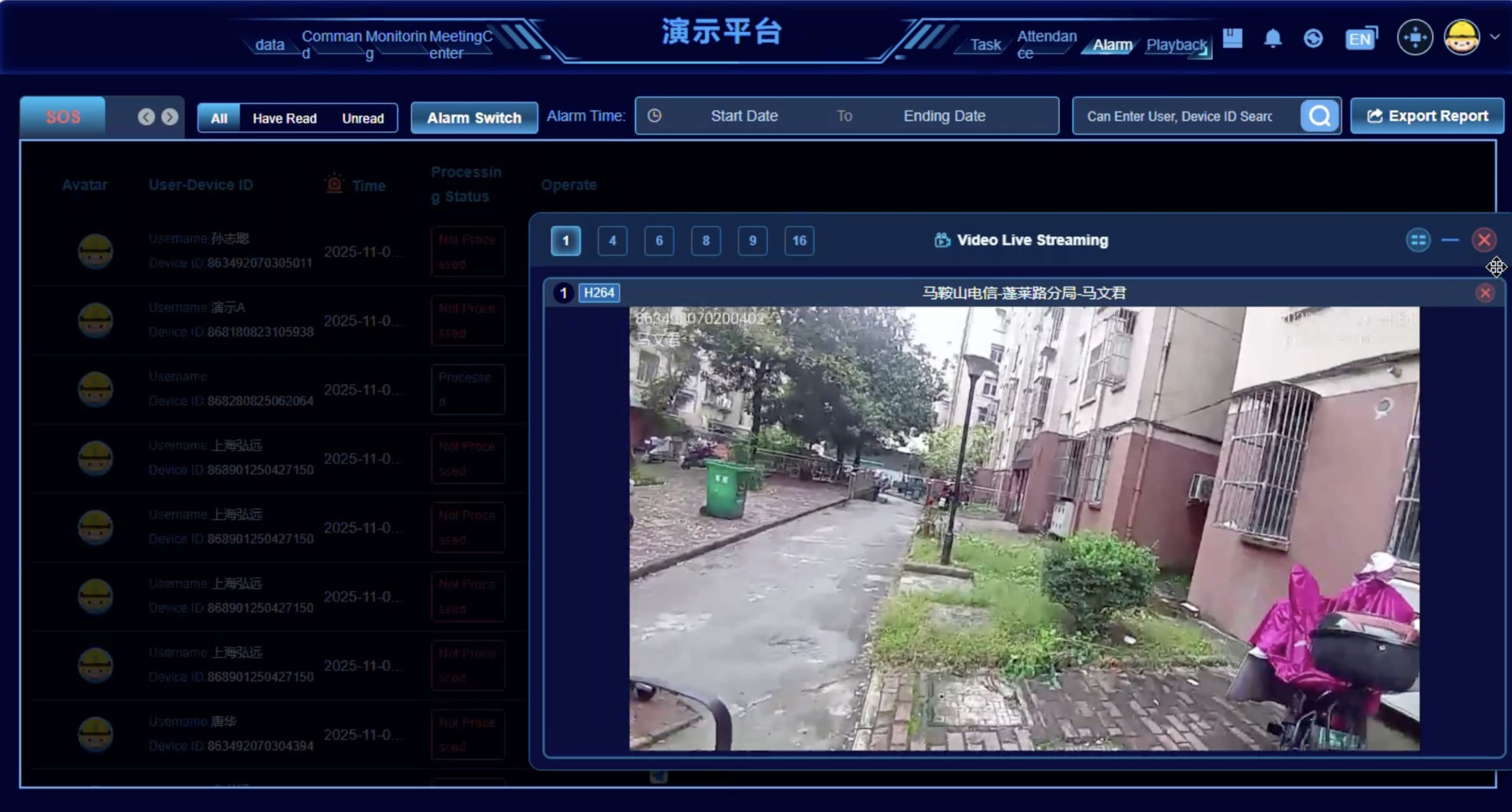
Alert handling + coordination workflow
Command & Coordination
- Handle safety alerts with acknowledgment workflow
- Team coordination features (intercom/broadcast when enabled)
- Real-time monitoring for supervisors (when enabled)
Playback & Audit
- Track playback for historical routes
- Event timeline review for incidents
- Media references (photo/video) when enabled
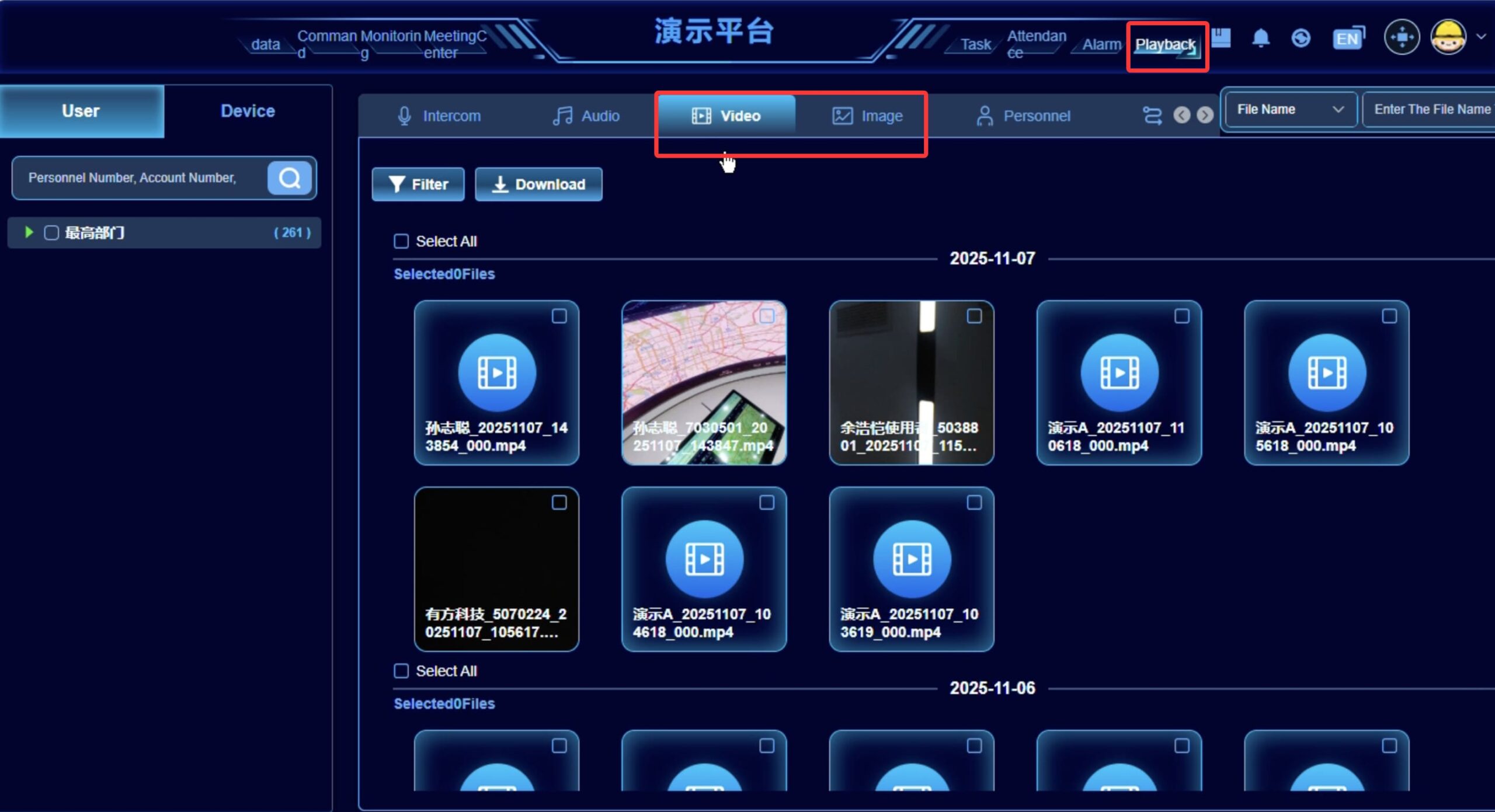
Route playback + event timeline
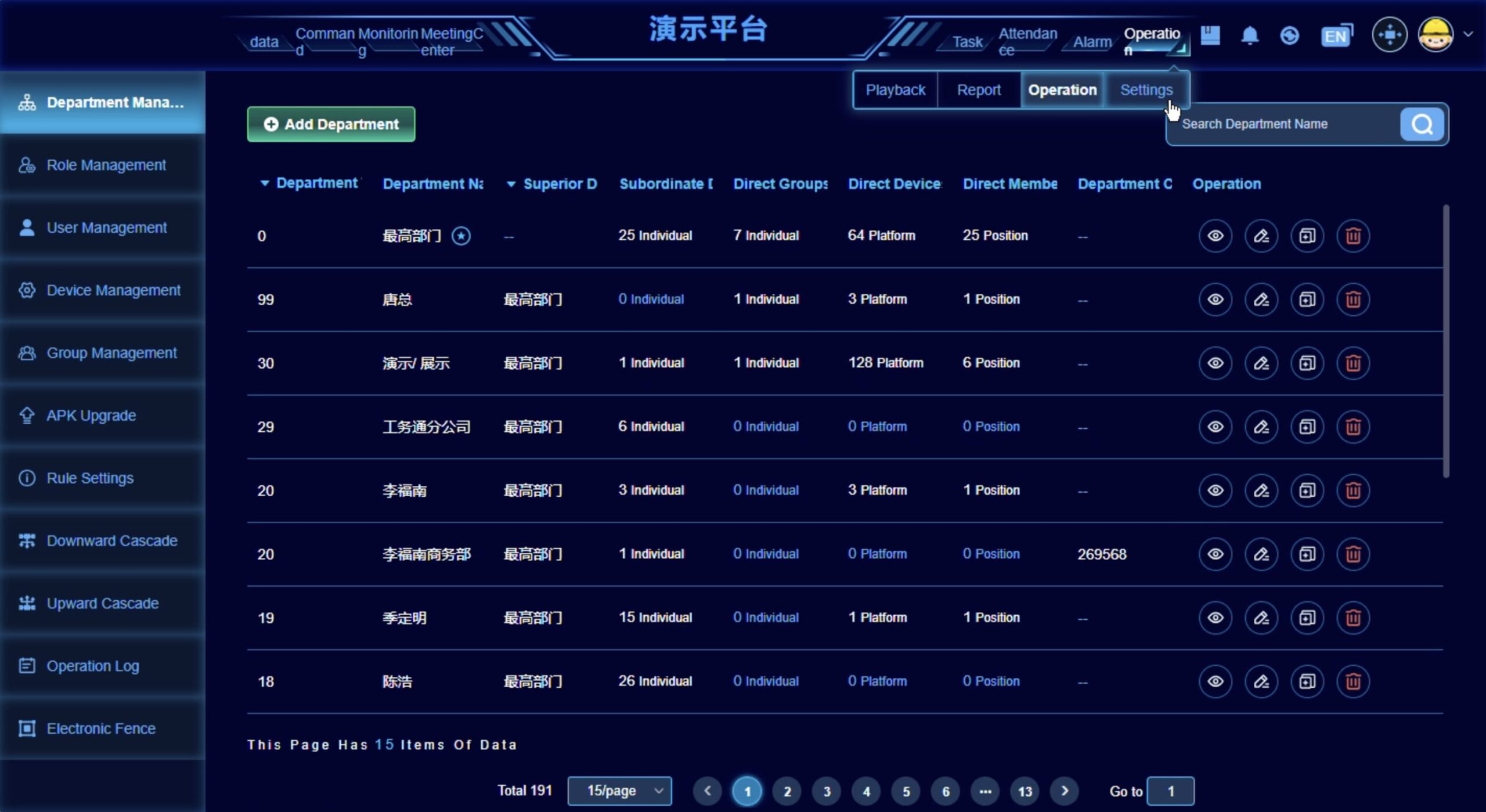
User roles + device management + reports
Admin Console
- User/role management and permissions
- Device provisioning and configuration templates
- Reports export (alerts, attendance/logs when enabled)
Deployment Options
Sample Cloud Demonstration
One-month functional demonstration for sample evaluation.
Review Sample Cloud AccessDeployment & Data Control
Customer-hosted platform for strict data control and compliance.
Deployment & Data ControlIntegration (API/SDK)
Connect device data into your existing platform and workflow.
Enterprise IntegrationIntegration data and technical boundaries
Integration scope depends on deployment model, device configuration, selected platform modules, and the customer-side system architecture.
| Data / Function | Examples | Integration Note |
|---|---|---|
| Device status | device identity, model, APK version, online/offline, user and organization binding, operational flags | Documented V3 device records are accessed through the deployed operational service layer after authentication. |
| Location and track | GCJ-02 position history, timestamps, altitude, speed and bearing | Confirm coordinate conversion, update frequency, offline recovery and overseas map behavior during the POC. |
| Safety alerts | SOS, stay-still, impact, helmet removal, live-wire, height, geofence events | V3 returns paged alarm records. Standard customer-system delivery is polling; active webhook delivery is separate engineering. |
| Video stream | request/close RTSP live sessions; retrieve RTSP host and port; conditional GB/T 28181 | The endpoints are documented; authentication, codec, latency, reconnection, concurrency and VMS operation require an agreed POC. |
| Media records | paged image, video, intercom and audio records with file paths and metadata | Validate file access, permissions, storage location, retention and download behavior in the deployment environment. |
| Documented outbound interface | rich-text message with optional image/video URLs and device playback instruction | Broader live, record, voice and remote-command results require model-specific POC confirmation. |
Standard integration path
Device data is handled by the HelmetSight platform first. The customer system then calls approved platform APIs or uses agreed integration interfaces.
Custom integration path
Direct device workflows, custom APKs, local AI boxes, RTSP routes, or special protocols require engineering review and project-specific confirmation.
Supported Smart Helmet Devices
The HelmetSight monitoring platform works together with wearable smart helmet devices used in field operations. Depending on project requirements, customers can choose an integrated smart helmet or a retrofit-oriented terminal.
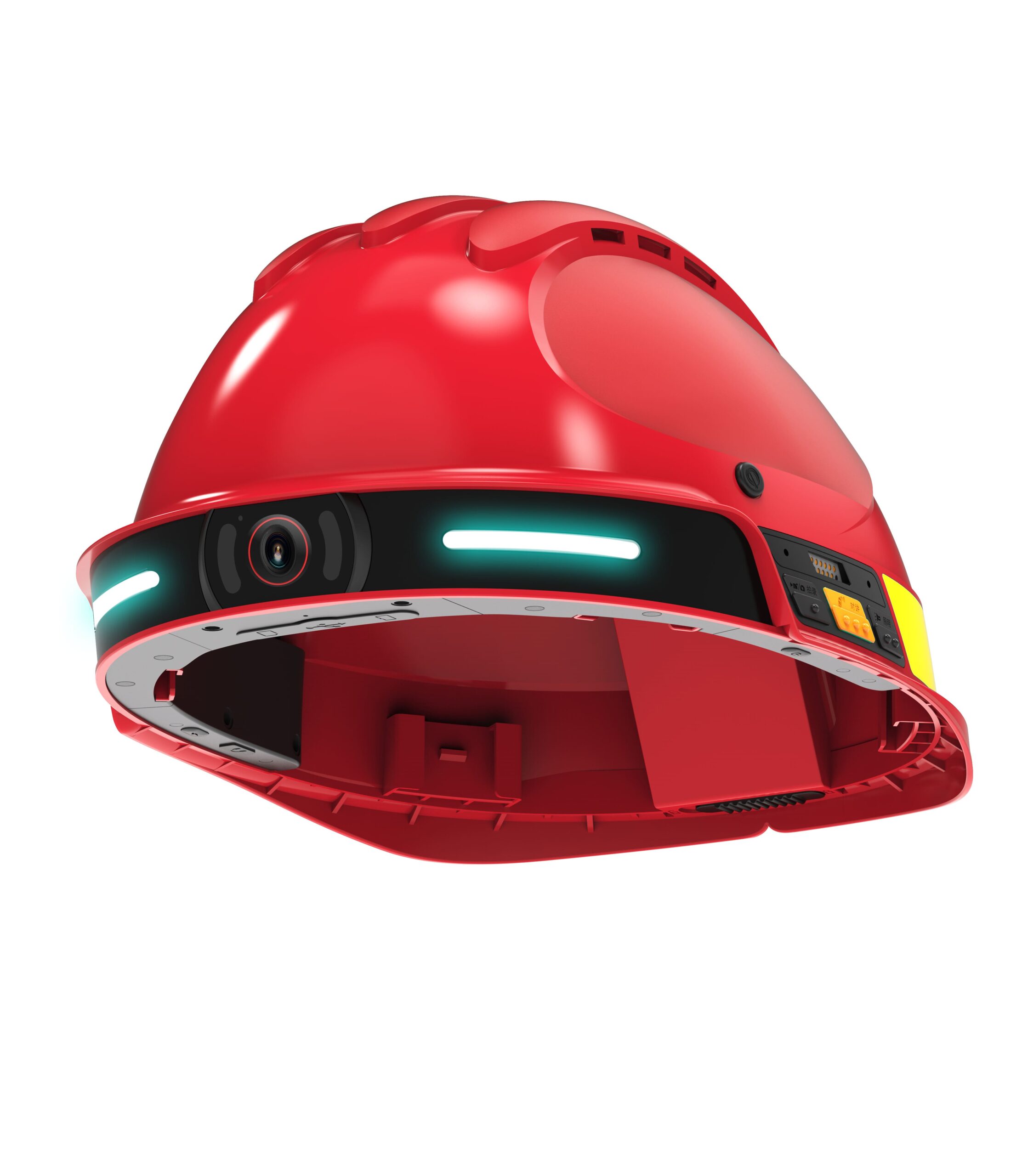
G808 Smart Safety Helmet
An integrated smart helmet terminal designed for field operations requiring video, voice communication, GPS positioning, and safety alerts.

G901 Helmet-mounted Recorder
A retrofit-oriented device that adds smart video, communication, and platform connectivity to existing helmets.
Both products can work with the HelmetSight monitoring platform, depending on operational requirements, deployment architecture, and hardware preference.
Solutions Supported by the Platform
The HelmetSight platform supports multiple field operation scenarios, including emergency response, construction supervision, and utility operations.
Emergency Rescue
Real-time video coordination, GPS tracking, and instant SOS for fire, disaster, and emergency response teams.
Construction Site Safety
Live supervision, geofencing alerts, man-down detection, and evidence recording for construction projects.
Utility & Power Operations
Live wire alarms, height-climbing detection, and remote monitoring for electrical and utility field work.
Governed system-path summary
Reviewed project fit
Use this approved summary to confirm software ownership, team responsibilities and the questions that belong in the pilot scope.
Complete Monitoring Platform
Configuration-dependentThe Complete Monitoring Platform provides ready-to-use device, location, alarm, media and operational workflows for organizations that do not want to build the main application layer themselves. The production hosting model, infrastructure, operating responsibility and supported configuration are confirmed for each project.
- Best fit
- Organizations that want a complete operational workflow and prefer to avoid developing the primary monitoring application and device-management services.
- Consider another path when
- Teams that require a fully customer-owned user experience, custom application lifecycle, or direct device interfaces without supplier operational software.
- Primary interface
- HelmetSight monitoring and administration interface
- HelmetSight provides
- The agreed monitoring application, operational service layer, device integration and project-defined deployment/support scope.
- Customer owns
- Business requirements, users, network and security inputs; infrastructure and operations responsibilities when customer-hosted.
Production server sizing, data retention, licensing, upgrades, support, integrations and regional requirements must be confirmed in the project scope.
Monitoring platform questions
These answers help buyers evaluate cloud access, on-premise deployment, API integration, video access, and platform planning before a technical call.
Discuss Platform PlanCan we use the platform via cloud subscription?
The current cloud offer is a one-month sample environment for 1–2 devices and selected functional demonstrations. It should not be treated as an overseas production POC, a tenant API service or the assumed long-term hosting model.
Do you support on-premise deployment?
Yes. On-premise deployment can be discussed for customers with data residency, private network, local storage, local video access, or strict control requirements. Available modules, server requirements, and integration scope should be confirmed during project evaluation.
Can we integrate data into our existing system?
Yes. In the standard Enterprise Integration path, the customer system polls selected documented V3 objects through the deployed operational service layer after authentication. SDK, RTSP and protocol scope are confirmed per project; active webhook delivery, direct database access and device-direct integration are separate requirements.
Can a local AI box or third-party platform access helmet video?
V3 documents platform-mediated RTSP session start, close, host and port interfaces. The selected device, deployment, network, codec, latency, stability, reconnection, concurrency and target VMS or AI pipeline must still pass a project POC. Direct device-to-third-party video should not be assumed.
What does the dashboard typically show?
The dashboard can show live map view, device online/offline status, battery/connectivity information, alert center, track playback, media records when enabled, user roles, device management, and reports depending on platform configuration.
What information is needed to propose an integration plan?
Please share device scale, number of sites, network environment, required data categories, video requirements, customer-side platform architecture, security requirements, preferred deployment model, and integration timeline.
Plan Your Platform
Deployment
Share your device scale, sites, and security requirements. Our engineers will propose the best deployment model.